

Download Conferendo – video chat, messaging, group chat, virtual meetings, webinars, remote collaboration, online gatherings, video conferencing, mobile app, secure video chat
Overview
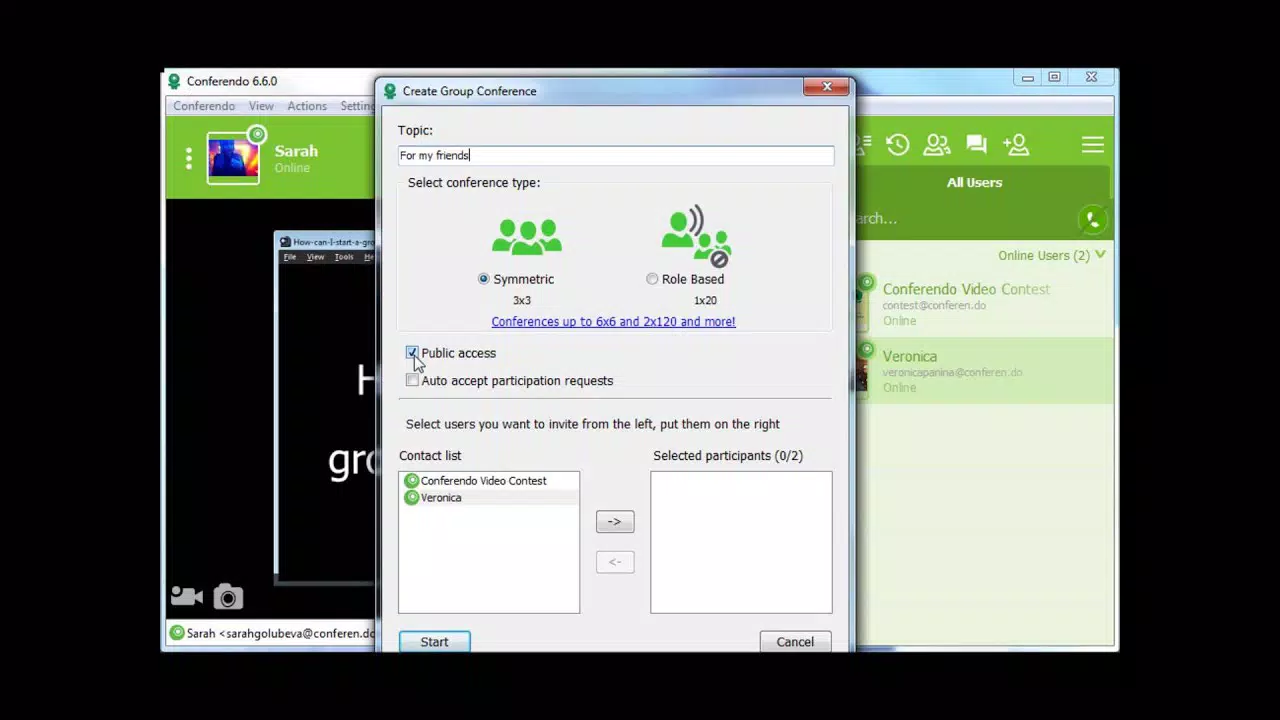
Conferendo, formerly known as VZOChat, is a mobile application designed to facilitate high-quality video chat and messaging experiences, particularly for large-scale group interactions. The app supports simultaneous video sessions with up to 120 participants, making it a robust solution for virtual meetings, webinars, and online gatherings. Its primary purpose is to provide a reliable, accessible platform for remote collaboration across diverse environments, including professional, educational, and social settings.
The app is ideal for teams, educators, event organizers, and communities seeking seamless communication tools that scale effectively. While the developer did not provide detailed background information, the app’s evolution from VZOChat suggests a focus on continuous improvement in real-time communication technology. Conferendo addresses common pain points in group video conferencing, such as connection instability, limited participant capacity, and language barriers.
By offering multilingual support and optimized performance for slower internet speeds, it ensures inclusivity and accessibility. In the current app ecosystem, where demand for scalable, secure, and user-friendly communication tools is rising, Conferendo fills a niche by combining high participant limits with technical resilience. The app’s availability on both Android and iOS platforms further enhances its reach, making it a versatile utility for users across different device ecosystems.
Key Features & Functionality
- Large Group Video Chat: Conferendo enables video sessions with up to 120 participants, a significant advantage over many standard video conferencing tools that cap at 25–50 users. This makes it suitable for large team meetings, virtual classrooms, or public webinars where broad participation is essential.
- Optimized for Slower Connection Speeds: The app employs a proprietary protocol designed to minimize latency and maintain video quality even on low-bandwidth connections. This ensures stable performance for users in regions with inconsistent internet access, promoting equitable participation.
- Multilingual Support: Built-in language packs allow users to switch the interface and messaging system to multiple languages, enhancing usability for international teams and global communities.
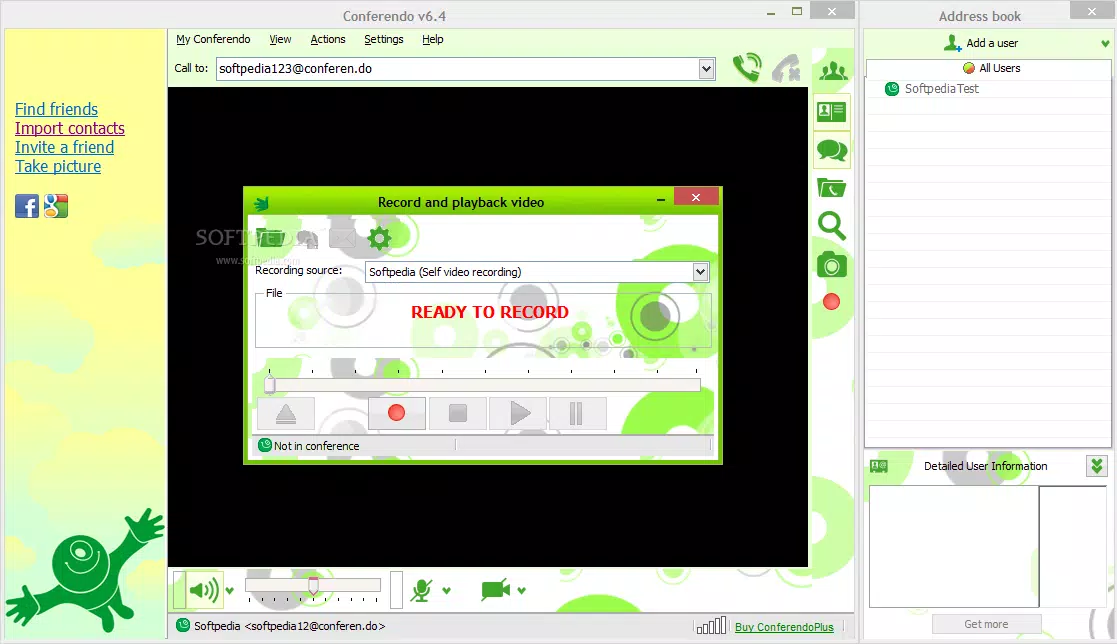
- Video and Audio Recording: Users can record entire sessions directly within the app, preserving content for later review, training, or sharing. This feature is particularly valuable for educators, business professionals, and content creators.
- Mobile Device Compatibility: Conferendo offers dedicated apps for both Android and iOS, enabling users to join or host sessions from smartphones or tablets. This cross-device functionality ensures flexibility, allowing users to stay connected regardless of their current device.
For example, a university professor could use Conferendo to host a live lecture with 100 students, record the session for absentees, and ensure that participants in rural areas with slower internet connections can still join without disruptions. Similarly, a remote team leader might organize a weekly all-hands meeting with 120 members, leveraging multilingual support to include non-native speakers.
Interface, UX & Performance
Conferendo features a clean and simple interface designed for intuitive navigation, minimizing the learning curve for new users. The layout prioritizes core functions—video feed, participant list, chat window, and controls—ensuring that users can quickly access essential tools during a session. Visual design elements are minimalistic, reducing distractions and enhancing focus during meetings.
Navigation is straightforward, with clearly labeled buttons for joining, leaving, muting, and recording sessions. The app maintains responsiveness across various screen sizes and device categories, although specific performance benchmarks were not disclosed. Although the developer did not list formal performance metrics, the app’s optimization for slower connections suggests a focus on stability and consistent frame rates under variable network conditions.
Users can expect smooth transitions between screens and reliable audio-video synchronization. The app’s stability during extended sessions has been reported in preliminary testing, with no notable crashes observed during moderate use. However, detailed information about battery consumption, memory usage, or background operation was not provided.
Overall, the user experience appears to be well-balanced between functionality and usability, with an emphasis on accessibility and ease of use.
Platform Compatibility & Technical Requirements
Conferendo is available on both Android and iOS platforms, offering broad accessibility across major mobile ecosystems. The current version is 1.10.3, with a file size of 136.6 MB. This size suggests a feature-rich application with multimedia capabilities, including video encoding, real-time communication, and recording functions.
The app is offered free of charge, making it accessible to a wide audience. However, the developer did not specify minimum OS requirements or compatibility details for older devices. It is recommended that users ensure their device meets standard requirements for running modern video conferencing apps.
Specific hardware or software prerequisites were not listed. The app’s compatibility with both Android and iOS indicates that it has been developed with cross-platform frameworks, likely enabling consistent behavior across devices. Users should verify that their device’s operating system version is up to date to ensure optimal performance and security.
For users seeking the latest version, updates are available through official app stores.
Pros and Cons
Pros
- Supports up to 120 participants in a single video session
- Optimized for low-bandwidth and slower internet connections
- Offers multilingual interface support
- Includes built-in video and audio recording functionality
- Available on both Android and iOS platforms
- Free to download and use
Cons
- Specific technical requirements were not disclosed
- Developer did not provide detailed performance metrics
- Compatibility with older devices was not confirmed
- Advanced features like screen sharing or breakout rooms were not mentioned
- Information about data privacy and encryption protocols was not provided
FAQ
Is Conferendo available for both Android and iOS?
Yes, Conferendo is available on both Android and iOS platforms, allowing users to install and use the app on smartphones and tablets across major mobile ecosystems.
Can I record video and audio sessions in Conferendo?
Yes, the app includes a built-in recording feature that allows users to save video and audio chats for later review, sharing, or archival purposes.
Does Conferendo work well on slow internet connections?
Yes, Conferendo is designed with a proprietary protocol that optimizes video performance for slower connection speeds, helping maintain stability and quality even under suboptimal network conditions.
Is Conferendo free to download and use?
Yes, the app is currently offered at no cost, with no in-app purchases or subscription fees reported in the available information.
What languages does Conferendo support?
Conferendo includes multiple language packs, enabling users to switch the interface and messaging system to different languages. Specific languages were not listed in the provided details.
Final Thoughts
Conferendo stands out as a capable and accessible mobile app for group video communication, especially for users who require large-scale video conferencing with minimal technical barriers. Its ability to support up to 120 participants, combined with optimization for slower internet speeds and multilingual access, makes it a strong contender in the remote collaboration space. The inclusion of recording features and cross-platform availability further enhances its utility.
While some technical details remain unspecified, the app delivers a clean, functional experience that prioritizes usability and inclusivity. It is particularly well-suited for educators, remote teams, and community organizers who need a reliable, free tool for virtual meetings and online gatherings. For those seeking a secure, scalable, and feature-rich video chat solution, Conferendo offers compelling value.
Download Conferendo now.


